Ghost-Infer vs LM Studio: benchmarking local LLMs on 12 GB of VRAM
I run all my local AI on an RTX 4070 Ti with 12 GB of VRAM, 64 GB of system RAM, and an i9. That's enough to run some impressive models — if you pick the right ones and load them the right way. This is the story of how I benchmarked everything, tried a faster inference engine, found out it wasn't for me, and ended up with a better model lineup than I started with.
The setup
All my models live in E:\Models and get served through LM Studio at localhost:1234/v1. My AI agent Hermes, my daily briefing, and my dev tools all hit that endpoint. It's the backbone of my local AI stack.
I wrote two PowerShell scripts to measure things properly:
- Measure-LlmSpeed.ps1 — fires standardized prompts (code, explain, review, math, and a ~12k-token long context) at any OpenAI-compatible endpoint and records generation speed, prefill speed, and time-to-first-token.
- Test-LlmQuality.ps1 — 11 correctness cases at temperature 0: math, logic, JSON extraction, code generation, four tool-calling scenarios, and retrieval from a long synthetic log. Every answer gets auto-checked and saved to JSON for side-by-side comparison.
Speed without quality is useless. That lesson cost me a model file.
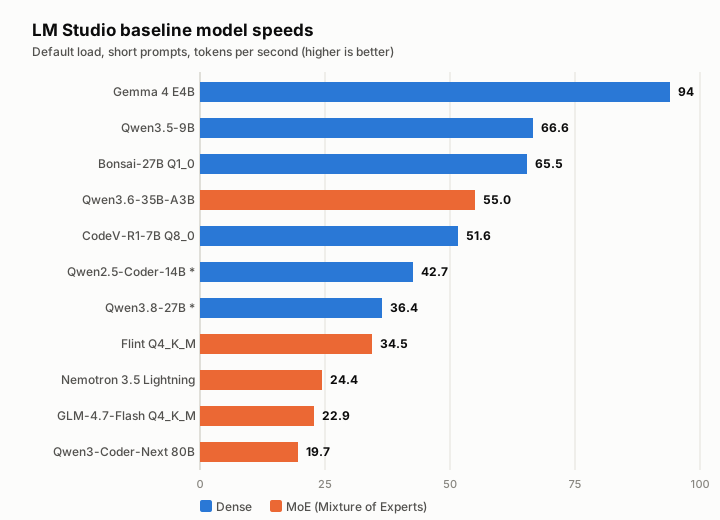
The baseline: every model I had
First I measured everything in LM Studio with default settings — just load the model and go. The spread was wild:
| Model | tok/s | Notes |
|---|---|---|
| Gemma 4 E4B | 94 | Fastest by far |
| Qwen3.5-9B | 66.6 | |
| Bonsai-27B Q1_0 | 65.5 | Aggressive quant |
| Qwen3.6-35B-A3B | 55.0 | MoE, my new daily driver candidate |
| CodeV-R1-7B Q8_0 | 51.6 | |
| Flint Q4_K_M | 34.5 | |
| Nemotron 3.5 Lightning | 24.4 | MoE 30B-A3B |
| GLM-4.7-Flash Q4_K_M | 22.9 | Previous daily driver |
| Qwen3-Coder-Next 80B | 19.7 | MoE, uses ~46 GB RAM |
Two dense models looked broken at first — Qwen2.5-Coder-14B crawled at 0.7 tok/s and Qwen3.8-27B at 6.6 tok/s. Turns out LM Studio's default context size overflowed VRAM. Loading them with -c 8192 fixed it: 42.7 and 36.4 tok/s respectively. Lesson: check context size before blaming the model file.
Enter Ghost-Infer
Ghost-Infer 0.4.0 is an alternative inference engine that promises faster generation, especially for MoE models. I tested it head-to-head with LM Studio on the same model files.
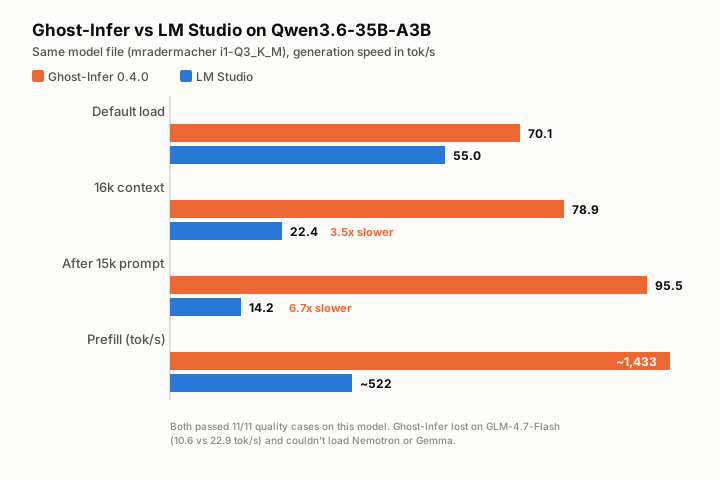
On my Hermes model — Qwen3.6-35B-A3B (mradermacher i1-Q3_K_M) — the results were stunning:
| Scenario | Ghost-Infer | LM Studio |
|---|---|---|
| Default load | 70.1 tok/s | 55.0 tok/s |
| 16k context | 78.9 tok/s | 22.4 tok/s |
| After 15k-token prompt | 95.5 tok/s | 14.2 tok/s |
| Prefill | ~1,433 tok/s | ~522 tok/s |
That long-context performance gap is enormous — nearly 7x faster after a big prompt. And it passed all 11 quality cases.
But then I tested other models:
- GLM-4.7-Flash Q4_K_M: 10.6 tok/s on Ghost-Infer vs 22.9 on LM Studio. The log showed
expert cache 0 slotsand only ~3.5 GB VRAM used. Prefill was 61 vs 358 tok/s. A disaster. - Qwen3-Coder-Next Q4_K_M: 6.2 tok/s cold (one round) vs 19.7 on LM Studio.
- Nemotron and Gemma: wouldn't load at all — unsupported architectures.
Ghost-Infer also refused the bartowski-quantized Qwen3.6 file with a "GPU backend does not handle F32 weights" error on its ssm_alpha/ssm_beta tensors. Other quirks: non-streaming replies left the <think> block inside content (clients have to strip it), the first request or two after loading were slow (~15 tok/s), and one entire run sat at 12–25 tok/s for ten minutes before returning to normal speed without explanation. Temperature-0 output wasn't consistent between runs either.
Verdict: Ghost-Infer is a specialist, not a general replacement. If you run one MoE model all day, it might be worth it. But I switch models constantly, and half my lineup either can't load or runs slower on it.
The Q3 vs Q4 quant showdown
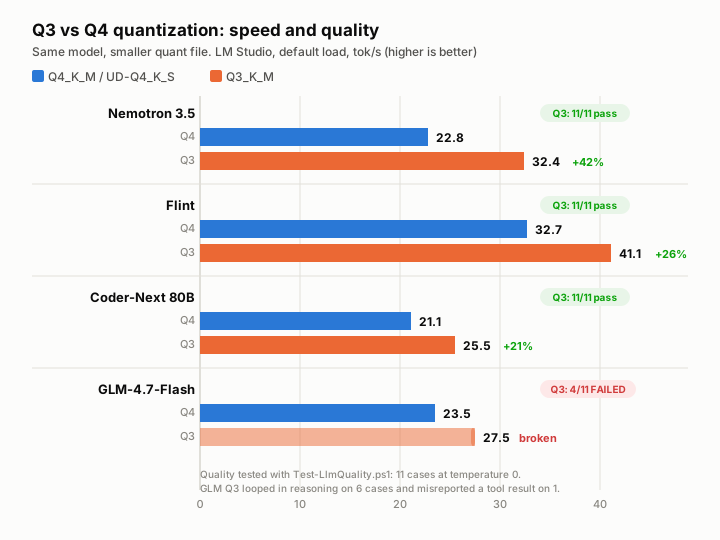
While I had the benchmark scripts running, I tested whether dropping from Q4 to Q3 quantization could buy speed without losing quality. I ran every model back-to-back in LM Studio, same prompts, same temperature-0 quality suite.
| Model | Q4 tok/s | Q3 tok/s | Q4 quality | Q3 quality |
|---|---|---|---|---|
| Nemotron 3.5 Lightning | 22.8 | 32.4 | 11/11 | 11/11 |
| Flint | 32.7 | 41.1 | 11/11 | 11/11 |
| Qwen3-Coder-Next | 21.1 | 25.5 | 11/11 | 11/11 |
| GLM-4.7-Flash | 23.5 | 27.5 | 11/11 | 4/11 |
Three out of four were clean wins — faster with identical quality. The Qwen3-Coder-Next Q3 build freed 15.5 GB of RAM compared to Q4's razor-thin 0.8 GB headroom.
But GLM-4.7-Flash's Q3 build (mradermacher i1-Q3_K_M) was a trap. It was 17% faster, but six of eleven test cases got stuck in reasoning loops that burned through the 2,500-token cap without producing an answer, and one case misreported a tool result (returned 6 degrees Celsius when the tool said 4). The speed gain was real, but the model was broken.
The lesson: always run quality tests, not just speed tests. A smaller quant isn't automatically safe.
The final lineup
After all the testing, here's what stayed and what got deleted:
Kept (Q3 builds, faster, same quality):
- Nemotron 3.5 Lightning — bartowski Q3_K_M
- Flint — bartowski Q3_K_M
- Qwen3-Coder-Next — bartowski Q3_K_M
Kept (Q4, because Q3 failed quality):
- GLM-4.7-Flash — zai-org Q4_K_M (still a solid daily driver)
Deleted:
- Ghost-Infer (uninstalled)
- The bartowski Qwen3.6 file Ghost-Infer used (kept the mradermacher build for LM Studio)
- The GLM-4.7-Flash i1-Q3_K_M file (broken quality)
- The three replaced Q4 files (Nemotron, Flint, Qwen3-Coder-Next)
Total storage freed: 111.5 GB. Not bad for a weekend of benchmarking.
What I'd tell someone starting out
- Write benchmark scripts. Don't eyeball speed in a chat window. Automate it so you can compare apples to apples.
- Test quality, not just speed. A model that generates garbage at 100 tok/s is worse than one that's correct at 25.
- Check your context size. A dense model that crawls might just need a smaller context window to fit in VRAM.
- MoE models are the sweet spot for 12 GB cards. They keep ~3B parameters active on the GPU and page experts through RAM. That's where the 64 GB system memory pays off.
- Don't fall in love with one benchmark. Ghost-Infer was incredible on one model and terrible on everything else. Test your actual workload.
My daily driver is now Qwen3.6-35B-A3B in LM Studio. GLM-4.7-Flash is the backup. Hermes is happy, and I have 111 GB of disk space back. I'll call that a win.