HostPanel so far, and why it moved to a bigger VPS
I run a handful of small websites: mine, and a couple for local groups. For years they sat on shared cPanel hosting. It worked, but I never knew what the box was doing, and every change meant clicking through someone else's control panel.
So I rented a small VPS and started building my own panel for it. I call it HostPanel. This is the log of the first two weeks.
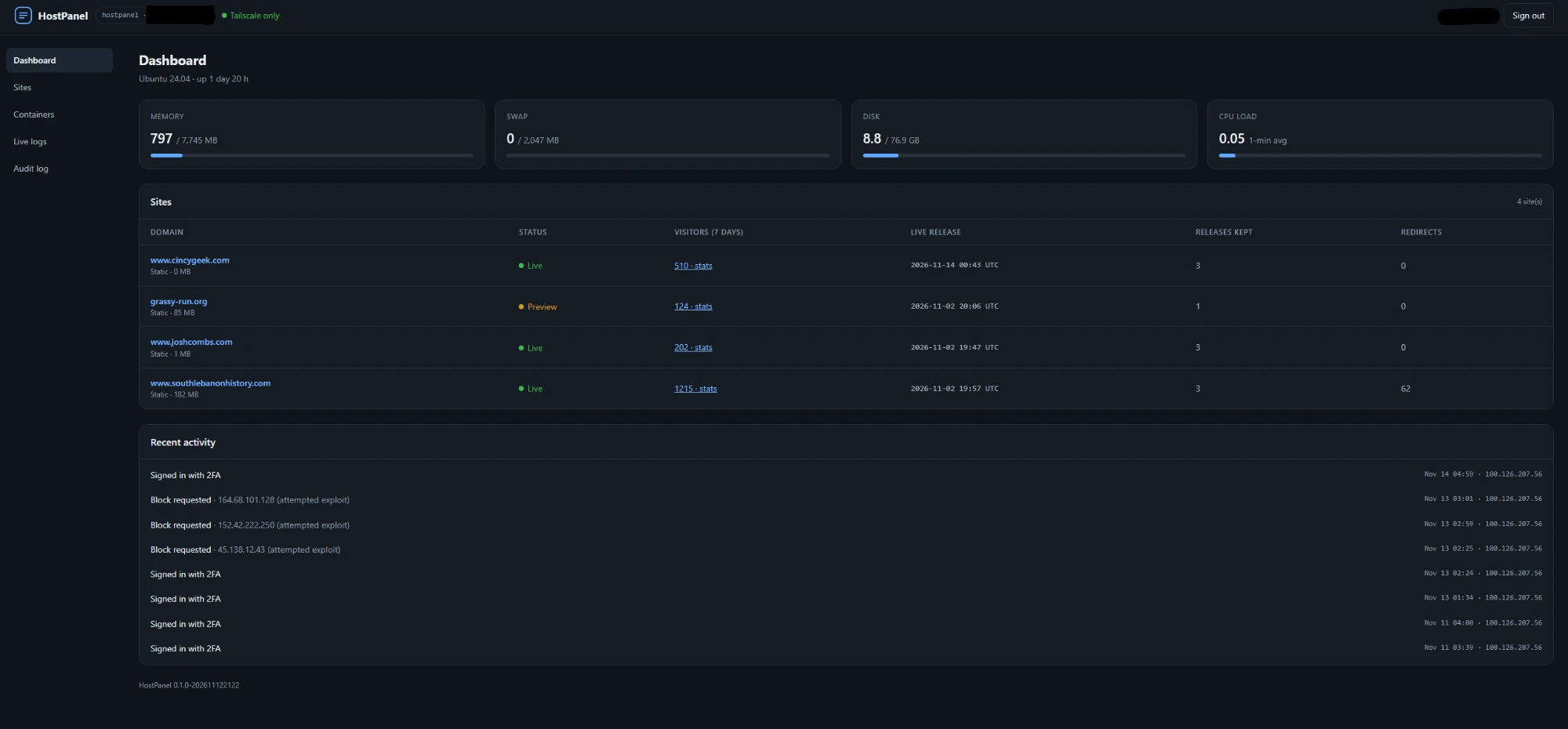
What I was trying to do
Three things:
- Host a few static sites with automatic HTTPS.
- Deploy, preview and roll back a site without opening an SSH session.
- Keep the admin side off the public internet completely.
That third one shaped everything else. A hosting panel is the most valuable thing on the server to break into, so mine has no public login page at all. It only answers on my private network, and it still asks for a password and a 2FA code.
What I built
The pieces, front to back:
- Caddy sits in front and handles HTTPS for every domain. Static sites are just folders it serves. Only a site that needs code running would get its own container.
- The panel is a small Go program in one container. Server-rendered pages, almost no JavaScript, no database. State is a JSON file because there is exactly one user.
- Deploys are releases. Every upload becomes a new timestamped folder, and a
currentlink points at the newest one. Going live is swapping the link. Rolling back is swapping it back.
sites/<domain>/releases/<timestamp>/
sites/<domain>/current  ->  the newest release
- Preview before live. A new release can be checked on the server before the domain points at it.
- The panel never runs commands on the host. It drops a small request file in a queue. A separate service picks it up, checks every field against a short list of allowed actions, and runs the same deploy script I use from my PC. If the panel were ever compromised, the most it could ask for is a deploy or a rollback of a site that already exists.
- Docker access goes through a filter. The panel can list, start, stop and restart containers and read their logs. It cannot create one or run a command inside one.
- Backups are pulled, not pushed. A machine at home fetches the nightly backup. The server has no way to reach in and delete the old ones.
Since then I've added visitor stats read from the web server's own logs (no tracking script, no cookie banner) and a security page that sorts ordinary traffic from the constant background noise of bots probing for WordPress logins that don't exist.
What broke
I took my own sites down for about an hour and a half. I had published the panel on the same port Caddy uses for HTTPS. It worked until I restarted Caddy from the panel. Caddy couldn't get its port back and stopped. Docker kept reporting the container as "running" the whole time.
Two lessons from that one:
- One owner per port. The panel now has its own.
- "Container running" does not mean "site up". Check the site itself.
Blocking an address with the firewall did nothing. Docker publishes the web ports with its own rules, and those run before the firewall tool I was using ever sees the traffic. The block list now lives in its own small firewall table that runs earlier than Docker's rules.
One domain kept showing the old site after the move. I had set up the new DNS zone, but the domain registrar was still pointing at the old host's nameservers. The new zone was correct and nobody was asking it. Now I check which nameservers the registry actually lists before I call a move done.
Why the bigger VPS
The first server had 1 GB of RAM and a 20 GB disk. Everything ran, but every decision started with "will it fit?"
- Static sites were served straight from Caddy partly because I couldn't spare the memory for a container per site.
- A swap file was there as a safety net against out-of-memory kills.
- Anything with a real database was off the table.
Then I looked at what I still wanted to add: visitor stats, the security page, uptime checks, and eventually sites that need a database. The new server has 4 cores, 8 GB of RAM and 75 GB of disk. Today the whole stack idles at around 800 MB, which would have been most of the old box before a single visitor showed up.
How the move went
No site went down. The order mattered more than anything clever:
- Make the base setup a script. One re-runnable script does the hardening and installs. A rebuild is now two commands instead of an afternoon of remembering what I did last time.
- Install the panel and backups on the new server.
- Deploy each site there and check the preview while the domain still pointed at the old server.
- Switch DNS, one site at a time.
- Keep the old server running for a few days for anyone whose DNS was still cached.
The small trick that saved the most typing: all of my scripts connect to the server by an SSH alias, never by address. So moving every script to the new server was a one-line change.
# ~/.ssh/config
Host hostpanel
    HostName <new server>

Host hostpanel-old
    HostName <old server>
If I did it again
- Script the base setup on day one. I only did it because of the move, and it's the part I'd least want to redo by hand.
- Size the server for what you plan to add, not for what runs today.
- Test the thing visitors see. Every outage so far had a green status light somewhere.
Next up for the panel: uptime checks and phone alerts, so I hear about a problem before a visitor does.